From familiar blue to endless dusk. Choose a world. Move your horizon.
N / S + 000.00001
OVERWORLD / HOMEWORLD
Your first look back.
A moment ago, it was beneath your feet. Now an entire planet fills your window. The Overworld becomes the starting point of your journey.
HOME → ORBIT
02 / THE ENGINE WORKSHOPSIX BLOCKS. TWO CONNECTIONS. ONE THRUSTER.
Build the engine. Understand every link.
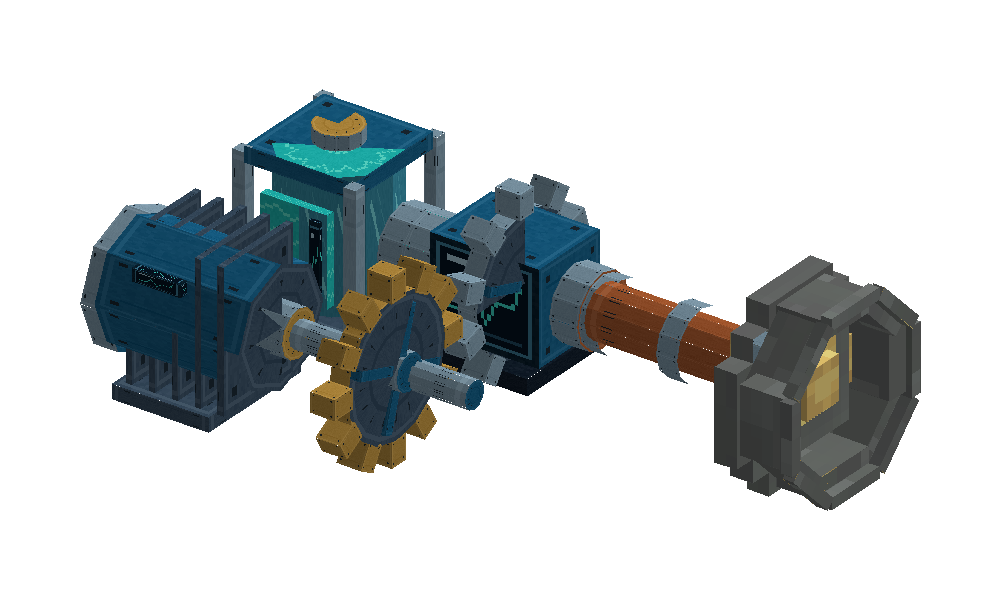
Explore the exact six-block arrangement from the supplied thruster build. Follow the fuel route, connect the pump drive, then add the missing throttle signal.
Interactive 3D is unavailable. The model image and written steps remain available.
FUEL LINE + PUMP DRIVE UPLOADED BUILD / SIX BLOCKSDRAG TO ORBIT · ARROW KEYS TO ROTATE
06 / 06READY FOR A TEST
Creative Motor
Power the pump, then add throttle
Place the Creative Motor next to the cogwheel, facing west, and set it to 16 RPM. The motor powers the pump; it does not directly drive the thruster.
CHECK BEFORE TESTING
The uploaded build contains no redstone source. Add a suitable redstone control to fire the thruster after checking its fuel supply.
REFERENCE POSITION 3 / 1 / 0X / Y / Z
01 / FLUID ROUTE
Fuel goes to the rear.
Aetherium travels from the tank, through the pump and pipe, into the thruster’s rear connection. The nozzle faces west; the fuel supply is on its east side.
Tank→Pump→Pipe→Thruster
02 / ROTATIONAL POWER
The motor drives the pump.
The Creative Motor turns the cogwheel, which drives the pump mechanism. Do not run a shaft into the thruster expecting rotational speed to become engine throttle.
Motor→Cogwheel→Pump
03 / ENGINE CONTROL
Redstone supplies throttle.
The six-block reference is a fuel-and-pump setup. Add redstone control separately, keep the exhaust clear and test the full arrangement on your assembled spacecraft.
Redstone→Thruster
Complete material list & reference coordinates +
All six non-air blocks from the uploaded structure; coordinates are relative to its origin.
Block
Quantity
X / Y / Z
Orientation
Aetherium Thruster
1
0 / 1 / 1
Facing west
Fluid Pipe
1
1 / 1 / 1
East–west connections
Mechanical Pump
1
2 / 1 / 1
Facing west
Creative Fluid Tank
1
3 / 1 / 1
Single tank with window
Cogwheel
1
2 / 1 / 0
Axis X
Creative Motor
1
3 / 1 / 0
Facing west; 16 RPM
03 / THE BLOCK FIELD GUIDENEXTSPACE MODELS. PRACTICAL ANSWERS.
Every block. A clear purpose.
A working spacecraft needs more than an engine. Inspect nextSpace's block models and textures, then learn where each system belongs and what it actually does.
3D is unavailable. The model image and textures remain available.
NEXTSPACE BLOCK MODEL
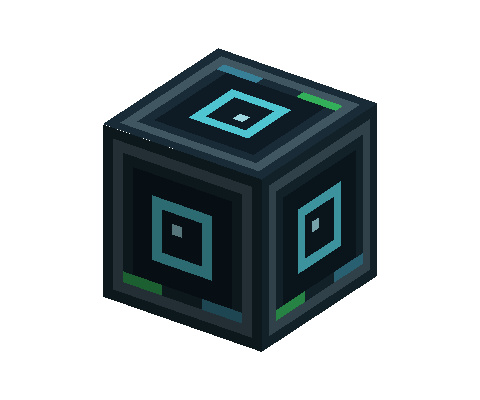
nextspace:creative_oxygen
MODEL TEXTURES OPEN TO INSPECT ↗
ATMOSPHERE / CREATIVE
Creative Oxygen
Give a sealed room an oxygen supply before treating it as a safe place to live.
HOW TO USE IT
Place it inside the room you want to supply. Keep the enclosing walls airtight and check the room after changing doors or other openings.
BUILD IT WITH
Use an airlock between the pressurized interior and space.
COMMON MISTAKE
A room is not automatically airtight. The block does not turn an open cabin into a sealed one.
nextSpace blocks use original models and nextSpace-owned textures. Create components use independent illustrations; vanilla surface references use custom replacements. Dynamic fluids, holograms and editable neon content are not simulated. Asset credits ↗
04 / THE ROAD AHEADSAME UNIVERSE. NEW HORIZONS.
The journey keeps growing.
From the first step into space to entirely new galaxies. Explore the milestones from the nextSpace roadmap.
01
TIME TO GET UP!
v0.1.0
Space dimension
Sun & planets
Planetary rings
Volumetric nebula
Zyron-7 clouds
Teleport & configuration
Graphics settings
Performance
Creative settings
02
QUALITY OF LIFE
v0.1.1
Aeronautics support
Performance & quality
Seamless transition
Spaceships
03
A TWINKLING STAR
v0.2.0
Outer Rim station (Nebula)
Flying station (Zyron-7)
New resources
Biomes and dimensions
New celestial bodies
Planets & moons
04
LIVE OUT THERE
v0.3.0
Structures
Building blocks
Research and technology
More satellite functions
Animals & living beings
Store system
Space stations
05
DONE?
v1.0.0
New galaxy
Other ideas...
Plans can evolve. This is a view of the project's direction, not a live release-status tracker.
nextSpace brings space, planets and spaceflight technology to Minecraft. From Create machines and custom spacecraft to oxygen and gravity, your journey takes shape one block at a time.
How do I install the mod?+
Use a Minecraft 1.21.1 profile with NeoForge. Download nextSpace and the dependencies listed for your release, then place the JAR files in the mods folder. Always follow the version requirements on the release page.
Are the planets on this page actual gameplay images?+
The planets and spacecraft are custom, stylized illustrations made for this website. They are not screenshots or to-scale representations from the game.